

定义全局变量isFailure表示游戏是否失败,初始化为0:
Dim Shared isFailure As Long '是否游戏失败当小蛇碰到画面边界时,则认为游戏失败。由于每次只有蛇头是新生成的位置,所以在moveSnake()函数中只需判断蛇头是否越过边界:
   If newHead_i >= BLOCK_HEIGHT Or newHead_i < 0 Or newHead_j >= BLOCK_WIDTH Or newHead_j < 0 Then
      isFailure = 1
      Return
   End If
蛇头越过边界,游戏失败,将isFailure设为1;执行return,即函数返回,不运行moveSnake()后面的语句。
另外,当蛇头与蛇自身发生碰撞时,游戏也失败:
   If Blocks(newHead_i, newHead_j) > 0 Then
      isFailure = 1
      Return
   End If
在show()函数中添加游戏失败后的显示信息:
   If isFailure Then
      gg.Font "黑体", 50, True
      gg.SetColor BGR(204,0,0) 'GDI的颜色值。
      gg.DrawString 60, 50, "游戏失败"
   End If
在updateWithoutInput()中添加代码,当isFailure为1时,直接返回,不运行后面的语句:
Sub updateWithoutInput(moveDirection As String) '与输入无关的更新
   If isFailure Then Return
在updateWithInput()中,只有当按下键盘且isFailure为0时,才进行相应的处理:
Sub updateWithInput(moveDirection As String) ' 和输入有关的更新
   If isFailure Then Return
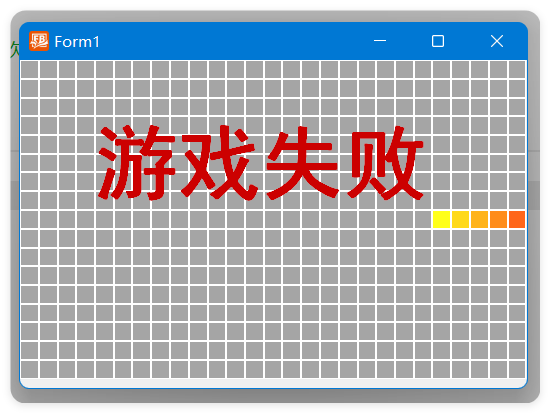
程序运行后输出如图7-8所示。
完整代码
#define BLOCK_HEIGHT 17 ' 高度上一共30个小格子
#define BLOCK_WIDTH 27  ' 宽度上一共40个小格子
#define BLOCK_SIZE 15   ' 每个小格子的长宽大小
'全局变量定义
Dim Shared Blocks(BLOCK_HEIGHT -1, BLOCK_WIDTH -1) As Long ' 二维数组,用于记录所有的游戏数据
Dim Shared isFailure As Long '是否游戏失败
Sub startup(gg As yGDI) '初始化函数
   Dim i As Long, j As Long
   Blocks(BLOCK_HEIGHT / 2, Int(BLOCK_WIDTH / 2)) = 1 '画面中间画蛇头,数字为1
   For i = 1 To 4
      Blocks(BLOCK_HEIGHT / 2, Int(BLOCK_WIDTH / 2) - i) = i + 1 '向左依次4个蛇身,数值依次为2、3、4、5
   Next
   gg.Pen 1, BGR(255, 255, 255)
End Sub

Sub show(gg As yGDI) '绘制函数
   gg.Cls
   Dim i As Long, j As Long

   '对二维数组所有元素遍历
   For i = 0 To BLOCK_HEIGHT -1
      For j = 0 To BLOCK_WIDTH -1
         If Blocks(i, j) > 0 Then
            gg.Brush HSBtoRGB_Gdi(HSB(Blocks(i, j) * 10, 90, 100, 255)) '根据元素值设定填充颜色
         Else
            gg.Brush BGR(165, 165, 165) 'GDI的颜色值。
         End If
         gg.DrawFrame j *BLOCK_SIZE, i *BLOCK_SIZE, BLOCK_SIZE, BLOCK_SIZE
      Next
   Next
   If isFailure Then
      gg.Font "黑体", 50, True
      gg.SetColor BGR(204,0,0) 'GDI的颜色值。
      gg.DrawString 60, 50, "游戏失败"
   End If
   gg.Redraw
End Sub

Sub moveSnake(moveDirection As String) ' 移动小蛇及相关处理函数
   Dim i As Long, j As Long
   For i = 0 To BLOCK_HEIGHT -1 '对行遍历
      For j = 0 To BLOCK_WIDTH -1 '对列遍历
         If Blocks(i, j) > 0 Then '大于0的为小蛇元素
            Blocks(i, j) += 1 '让其+1
         End If
      Next
   Next
   Dim As Long oldTail_i, oldTail_j, oldHead_i, oldHead_j '定义变量,存储旧蛇尾、旧蛇头坐标
   Dim mm As Long '用于记录最大值
   For i = 0 To BLOCK_HEIGHT -1 '对行遍历
      For j = 0 To BLOCK_WIDTH -1 '对列遍历
         If mm < Blocks(i, j) Then '如果当前元素值比max大
            mm        = Blocks(i, j) '更新max的值
            oldTail_i = i ' 记录最大值的坐标,就是旧蛇尾的位置
            oldTail_j = j
         End If
         If Blocks(i, j) = 2 Then '找到数值为2
            oldHead_i = i ' 数值为2恰好是旧蛇头的位置
            oldHead_j = j '
         End If
      Next
   Next
   Dim newHead_i As Long = oldHead_i ' 设定变量存储新蛇头的位置
   Dim newHead_j As Long = oldHead_j

   If (moveDirection = "左") Then
      newHead_j = oldHead_j -1 ' 向左移动
   ElseIf (moveDirection = "右") Then
      newHead_j = oldHead_j + 1 '向右移动
   ElseIf (moveDirection = "上") Then
      newHead_i = oldHead_i -1 ' 向上移动
   ElseIf (moveDirection = "下") Then
      newHead_i = oldHead_i + 1 ' 向下移动
   End If
   Print newHead_j , BLOCK_WIDTH
   '当小蛇碰到画面边界时
   If newHead_i >= BLOCK_HEIGHT Or newHead_i < 0 Or newHead_j >= BLOCK_WIDTH Or newHead_j < 0 Then
      isFailure = 1
      Return
   End If
   '当蛇头与蛇自身发生碰撞时
   If Blocks(newHead_i, newHead_j) > 0 Then
      isFailure = 1
      Return
   End If
   Blocks(newHead_i, newHead_j) = 1 ' 新蛇头位置数值为1
   Blocks(oldTail_i, oldTail_j) = 0 ' 旧蛇尾位置变成空白

End Sub

Sub updateWithoutInput(moveDirection As String) '与输入无关的更新
   If isFailure Then Return
   Static waitIndex As Long = 1  ' 静态局部变量,初始化时为1
   waitIndex += 1  '每一帧+1
   If waitIndex =10 Then '等于10才执行,这样小蛇每隔10帧移动一次
      moveSnake(moveDirection) '调用小蛇移动函数
      waitIndex =1  '再变成1
   End If
   Sleep 10  '暂停若干毫秒
End Sub

Sub updateWithInput(moveDirection As String) ' 和输入有关的更新
   If isFailure Then Return
   If IsKeyPress(&H57) Then
      moveDirection = "上"
   ElseIf IsKeyPress(&H53) Then
      moveDirection = "下"
   ElseIf IsKeyPress(&H41) Then
      moveDirection = "左"
   ElseIf IsKeyPress(&H44) Then
      moveDirection = "右"
   End If
End Sub

Sub 游戏执行过程(hWndForm As hWnd)
   Dim gg As yGDI = hWndForm
   startup(gg) '初始化函数,仅执行一次
   Dim moveDirection As String ="右" '小蛇移动方向
   Do
      show(gg) ' 进行绘制
      updateWithInput(moveDirection) ' 和输入有关的更新
      updateWithoutInput(moveDirection) ' 和输入无关的更新
   Loop
End Sub
评论一下?