

为了实现键盘控制游戏角色移动,首先定义结构体用于记录玩家位置:
Type Player ' 结构体,用于记录玩家位置
   i As Long
   j As Long
End Type
定义全局变量player储存游戏角色的位置:
Dim Shared Players As player '玩家全局变量在初始化时,找到二维数组level中值为'p'的元素,得到玩家位置赋给变量player,再把元素值变成'e':
Sub startup() '初始化函数
   Dim i As Long, j As Long
   For i = 0 To B_NUM -1 '遍历关卡二维数组数据
      For j = 1 To B_NUM
         If Mid(level(i), j, 1) = "p" Then '找到地图中player的位置
            Players.i = i '设定player的位置
            Players.j = j
            Mid(level(i), j, 1) = "e" '把地图元素变成空白empty
            Exit For, For '连续跳出2个循环
         End If
      Next
   Next
End Sub
其中 Mid 语句/函数 是读取或设置字符串中的字符
修改show()函数,根据player中存储的位置,绘制出玩家图案:
   i = Players.i
   j = Players.j
   '一个红色圆脸
   gg.Pen 0, 0 '框
   gg.Brush BGR(255, 0, 0) '一个红色圆脸
   gg.DrawEllipse(j + 0.1) *B_SIZE, (i + 0.1) *B_SIZE, B_SIZE * 0.8, B_SIZE * 0.8
   '两个黑色眼睛
   gg.Brush BGR(90, 90, 90) 'GDI的颜色值。
   gg.DrawEllipse(j + 0.2) *B_SIZE, (i + 0.35) *B_SIZE, B_SIZE  * 0.25, B_SIZE * 0.25
   gg.DrawEllipse(j + 0.55) *B_SIZE, (i + 0.35) *B_SIZE, B_SIZE * 0.25, B_SIZE * 0.25
   '一个深灰色嘴巴
   gg.DrawFrame(j + 0.3) *B_SIZE, (i + 0.7) *B_SIZE, B_SIZE * 0.4, B_SIZE * 0.1
在update()函数中,根据用户按下的A、S、D、W键,控制角色向左、下、右、上移动:
Sub updateWithInput(hWndForm As hWnd, gg As ygdi) ' 和输入有关的更新
   Static pp As Long '预防一直按下,造成一直移动
   If pp = 1 Then
      If IsKeyPress(&H57) = 0 And IsKeyPress(&H53) = 0 And IsKeyPress(&H41) = 0 And IsKeyPress(&H44) = 0 Then
         pp = 0
      End If
   Else
      If IsKeyPress(&H57) Then ' 上
         Players.i = Players.i -1
         pp       = 1
      ElseIf IsKeyPress(&H53) Then ' 下
         Players.i = Players.i + 1
         pp       = 1
      ElseIf IsKeyPress(&H41) Then ' 左
         Players.j = Players.j -1
         pp       = 1
      ElseIf IsKeyPress(&H44) Then '  右
         Players.j = Players.j + 1
         pp       = 1
      End If
   End If
End Sub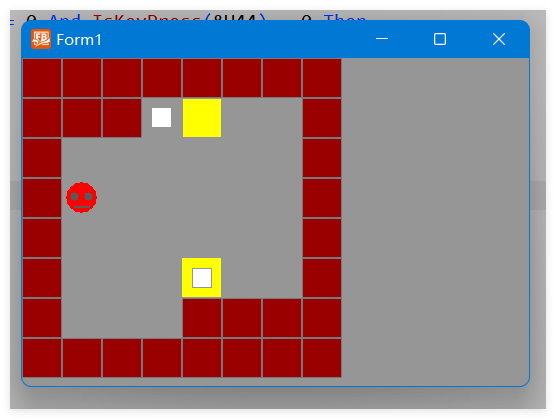
读者可以自己更改代码,看看是否和预料的结果一样。如果不同,自己试着排除错误。
评论一下?